Google has improved the UI of one of their most popular service: Google Reader, their web-based RSS feed reader. Besides the slight changes in the look and feel, CPU load when accessing the service has decreased a lot.
In an Acer Aspire One, you can now really enjoy the site without your web browser becoming unresponsive once in a while. In an even less powerful device like the Nokia N810, your CPU stops being at the 100% all the time and, if you do not want the full view of the posts you can use the list mode. This mode allows you to view only the name of the origin web site for the post, and its subject and date, so you can avoid all the posts that are not attractive. This list view is an intermediate step between the traditional Google Reader "full web experience" and the simpler Google Reader Mobile.
The main difference is that Google Reader Mobile offers a list of links (one link for each post) and the selection of a post means loading a new page, while the new list view in the "full" Google Reader shows the content of the post using JavaScipt. Luckily, the use of Javascript all over the Google Reader site seems much lighter in terms of CPU consumption.
Great work!
Showing posts with label n810. Show all posts
Showing posts with label n810. Show all posts
Saturday, December 06, 2008


Saturday, October 18, 2008
Flash content in mobile devices or how to soothe the pain in maemo
Everybody is very happy with the support of the full web in mobile devices, but any regular user knows/suffers the fact of trying to enjoy rich web sites from a mobile device. Even with a powerful mobile device like the Nokia N810, making use of WiFi connectivity powered by a good ADSL/Cable network connection behind, certain web sites are a hell to enjoy.
The user, although having a full-web browser, ends up using a simpler mobile version for the browser not to drain battery power (for instance, due to the Javascript engine making intensive use of the CPU in Facebook or in Google Reader). The Google Reader site is a good example of how the mobile version is good enough for us to do what we want with almost no cost in computational terms.
I have always loved visiting Spanish sports online-newspapers like As or Marca from the N810, but always making an exercise of injecting patience to my state of mind before accessing: they are filled with Flash content (mainly with advertising purposes) that makes loading the main page as painful as a kick on your butt.
Some days ago, I specifically searched for some sort of Flash blocker, taking into account that such an add-on exists in Firefox and that maemo's microb is based on the Firefox engine. I discovered the Browser Extras repository and then found a Flashblocker port for MicroB.
If you want to know how good it was installing this add-on, you need to read the full post in the OMAG blog.
The user, although having a full-web browser, ends up using a simpler mobile version for the browser not to drain battery power (for instance, due to the Javascript engine making intensive use of the CPU in Facebook or in Google Reader). The Google Reader site is a good example of how the mobile version is good enough for us to do what we want with almost no cost in computational terms.
I have always loved visiting Spanish sports online-newspapers like As or Marca from the N810, but always making an exercise of injecting patience to my state of mind before accessing: they are filled with Flash content (mainly with advertising purposes) that makes loading the main page as painful as a kick on your butt.
Some days ago, I specifically searched for some sort of Flash blocker, taking into account that such an add-on exists in Firefox and that maemo's microb is based on the Firefox engine. I discovered the Browser Extras repository and then found a Flashblocker port for MicroB.
If you want to know how good it was installing this add-on, you need to read the full post in the OMAG blog.
Thursday, July 03, 2008
Android on N810
Thanks to the easy install procedure made available in internet tablet talk, I am enjoying android in my N810.
Slow, smelling like alpha software, but working. It seamlessly detected and used my WiFi (I suppose it takes data from the N810 install because otherwise I wonder how he managed to crack WPA :-) ).
I hope it will get improved along time. Looking forward to new and faster versions.
Slow, smelling like alpha software, but working. It seamlessly detected and used my WiFi (I suppose it takes data from the N810 install because otherwise I wonder how he managed to crack WPA :-) ).
I hope it will get improved along time. Looking forward to new and faster versions.
Thursday, May 15, 2008
Enter OMAG!
I was going to post about the new version of Vagalume, but I guess I will do it here. You are all welcome to the web site of the Open Mobile Astur Group :-)
Friday, April 11, 2008
Maemo, Wiimote and remote controlling: A perfect combination
In the last two weeks, a new maemo friend is in town. He is an old colleague and workmate who has just bought an N810 and developed this in such a few time. Don't you think he will be a valuable contributor to the maemo scene? :-)
Watch the video:
Watch the video:
Sunday, April 06, 2008
Maemo is getting better and better
A lot of good news on Maemo.
Canola 2 jumps to beta 8 with lots of bugs fixed:
I copied this from the news page of the Canola 2 project at INdT, as there seems to be no permalinks for their news.
All existing add-ons (YouTube, so far) and themes have been updated and you should go for the last version if you change to Canola 2 beta 8.
But the best is yet to be told: there is a LastFM plugin! I love it, although its functionality does not match (yet) Vagalume's. But, to be fair, Vagalume does not have so great interface as Canola.
Ah, and more things not yet supported but in sight:
The YouTube results paging is a must as now the interface does limit the number of results you can enjoy. And what to say about the chance to access remote contents via UPnP. Media in your S60 3rd Edition phone or your PS3.
More on Maemo: as announced in the CTIA'09, the WiMax version is coming. Errrr... well, congratulations to the ones who will buy it and use WiMax, but I do not think this will happen in Spain. The best news from the last edition of CTIA was said in the same announcement from Nokia as some sort of additional-and-less-important information (source: Internet Tablet Talk):
So N800 and N810 owners should be looking forward to a new system update for these gadgets.
And last but not least, some more disruptive applications for the N800/N810. I am still checking out Numpty Physics and trying to advance to the 4th stage :-) MyPaint screenshots look amazing although I guess that drawing is not one of the things that I best do. Anyway, I will try to get better at it and try to develop cool stuff like these:


Canola 2 jumps to beta 8 with lots of bugs fixed:
Better third-party plugin support: More API available for third-party plugin development.
Better handling of large titles in titlebar.
Fix during cover change.
Sort files inside "Browse by Folder".
Show current time during seek.
Fixed bugs in video player.
Ability to refresh podcast feeds manually.
Ability to select where downloaded contents go.
Smooter animation in the lists and sub menus.
General theme improvements.
Allow more podcast feeds.
Support compressed feeds and request them by default.
Better handle out of space.
Show more normalized download velocity and time remaining.
Various fixes in network handling in Podcast.
Restart downloads when podcast plugin is loaded.
Make it possible to preview the podcast description in the list.
Make it possible to read the feed description while listening to the podcast episode.
Remove episodes from "Podcast: New Episodes" when listened to or deleted.
Show the podcast feed title in the player as album and not the parent title.
Ogg support for the Scanner is back.
I copied this from the news page of the Canola 2 project at INdT, as there seems to be no permalinks for their news.
All existing add-ons (YouTube, so far) and themes have been updated and you should go for the last version if you change to Canola 2 beta 8.
But the best is yet to be told: there is a LastFM plugin! I love it, although its functionality does not match (yet) Vagalume's. But, to be fair, Vagalume does not have so great interface as Canola.
Ah, and more things not yet supported but in sight:
Playlist creation (on-the-move) + Playlist saving and other related features
Youtube paging capabilities for the search results (to allow more results to be browsed)
UPNP support
PNG thumbnail support still missing
Full hardware key mapping support
The YouTube results paging is a must as now the interface does limit the number of results you can enjoy. And what to say about the chance to access remote contents via UPnP. Media in your S60 3rd Edition phone or your PS3.
More on Maemo: as announced in the CTIA'09, the WiMax version is coming. Errrr... well, congratulations to the ones who will buy it and use WiMax, but I do not think this will happen in Spain. The best news from the last edition of CTIA was said in the same announcement from Nokia as some sort of additional-and-less-important information (source: Internet Tablet Talk):
upgraded OS2008 [that] introduces useful new features to the platform, including an enhanced e-mail client, support for Chinese character rendering in the browser and RSS feeds and Seamless Software Update functionality to eliminate manual software updates, making periodic updates of the operating system quick and easy. While standard on the Nokia N810 WiMAX Edition, current owners of Nokia N810 and N800 Internet Tablets with earlier operating systems will be able to upgrade their device to the revised operating system for free during the second quarter of 2008.
So N800 and N810 owners should be looking forward to a new system update for these gadgets.
And last but not least, some more disruptive applications for the N800/N810. I am still checking out Numpty Physics and trying to advance to the 4th stage :-) MyPaint screenshots look amazing although I guess that drawing is not one of the things that I best do. Anyway, I will try to get better at it and try to develop cool stuff like these:


Tuesday, February 05, 2008
N810 as a PDA
Someone asked me the other day whether the N810 had PDA functionality. Well, it does not have it by default. But if you install the GPE packages and then erminig, you have your Google Calendar and your GPE calendar sync'ed.
Besides, I have just discovered Companion Link for Google, which provides a 2-way synchronization between Outlook and Google Calendar. Adding Nokia PC Suite to this, I can have all my tasks and appointments in my hand from any PC (although I'll be more productive with my PC with Outlook installed), my phone and the N810.
Next step, contacts synchronization. Then I will be able to say the N810 can play the role of a PDA, besides all its wonderful functionalities.
Besides, I have just discovered Companion Link for Google, which provides a 2-way synchronization between Outlook and Google Calendar. Adding Nokia PC Suite to this, I can have all my tasks and appointments in my hand from any PC (although I'll be more productive with my PC with Outlook installed), my phone and the N810.
Next step, contacts synchronization. Then I will be able to say the N810 can play the role of a PDA, besides all its wonderful functionalities.
Saturday, February 02, 2008
Vagalume update
Vagalume has jumped up to version 0.5. Thanks to Alberto from Igalia (and to the rest of contributors, of course) for keeping on with the good work. More last.fm in your maemo, debian or ubuntu machine!
Sunday, January 20, 2008
Connecting the N810 to Internet via 3G
You have to follow these simple steps (I suppose Bluetooth is already on for your phone and your N810):
- Pair your N810 and your phone (N80 in my case) via Bluetooth. This is achieved in the N810 by going to the Control Panel, then choose Phone and add a New one. You'll see your phone and if you follow the wizard you'll pair them forever for automatic connection between every time that both BT interfaces are turned on.
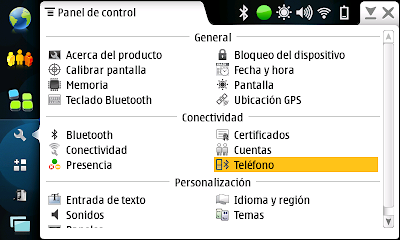
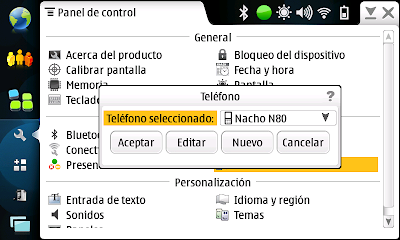
- In the Control Panel, choose Connectivity, then press button Connections and then New. Follow the wizard, name the connection (for example, I named it Yoigo over BT) and , for the type of connection, choose Data Packets. In order to configure the Data Packets connection, you should enter the Access Point Name (internet for Yoigo), the Dialing Number (*99# for Yoigo), and your username/password with your provider (both empty in my case). In fact, the autonfiguration message, that Yoigo sends to your phone when you first turn on your phone and connect to their network, creates a network connection profile for the phone to act as a GPRS/UMTS modem and it looks like the N810 read its information and filled automatically all the details.
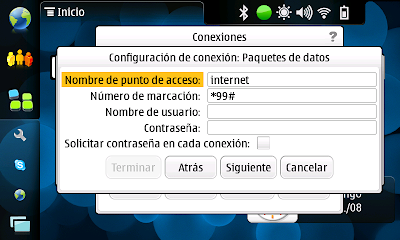
By the way, from now and on, it is very likely that your N810 connects via 3G when its BT interface and your phone's are both on. If you press on the connectivity icon in the systray of the N810, you can tell it to connect automatically to any connection, to WiFi or to phone (and additionally to always ask before establishing any connection).
- Pair your N810 and your phone (N80 in my case) via Bluetooth. This is achieved in the N810 by going to the Control Panel, then choose Phone and add a New one. You'll see your phone and if you follow the wizard you'll pair them forever for automatic connection between every time that both BT interfaces are turned on.


- In the Control Panel, choose Connectivity, then press button Connections and then New. Follow the wizard, name the connection (for example, I named it Yoigo over BT) and , for the type of connection, choose Data Packets. In order to configure the Data Packets connection, you should enter the Access Point Name (internet for Yoigo), the Dialing Number (*99# for Yoigo), and your username/password with your provider (both empty in my case). In fact, the autonfiguration message, that Yoigo sends to your phone when you first turn on your phone and connect to their network, creates a network connection profile for the phone to act as a GPRS/UMTS modem and it looks like the N810 read its information and filled automatically all the details.

By the way, from now and on, it is very likely that your N810 connects via 3G when its BT interface and your phone's are both on. If you press on the connectivity icon in the systray of the N810, you can tell it to connect automatically to any connection, to WiFi or to phone (and additionally to always ask before establishing any connection).
Weird behaviour of N810
Reflashing the N810 fixed a problem that started happenning to me this week. Headphones only played through the left channel.
After reflashing, stereo audio sounded in a perfect way once again. I've been enjoying it for some hours and... the bug showed up again.
If I move the connector a bit I can make both channels sound OK but a slight movement makes me lose the right channel again.
Playing sound through the external speakers is fine. This is really weird and pretty uncomfortable.
[ADDED about one hour later]
I rebooted the N810 and both channels are back in headphones. Not without problems, because I could not turn it on. I had to let it rest and then it turned on. I hope I am not starting to suffer another bug.
After reflashing, stereo audio sounded in a perfect way once again. I've been enjoying it for some hours and... the bug showed up again.
If I move the connector a bit I can make both channels sound OK but a slight movement makes me lose the right channel again.
Playing sound through the external speakers is fine. This is really weird and pretty uncomfortable.
[ADDED about one hour later]
I rebooted the N810 and both channels are back in headphones. Not without problems, because I could not turn it on. I had to let it rest and then it turned on. I hope I am not starting to suffer another bug.
Beware of the red pill
For the owners of an N810, if you enter Red Pill mode (which means that you gain root access to the OS), then you'll find that there are lots of updates related to the very core of the OS.
Well, do not update all those libraries if you do not know what you are exactly doing (as it is my case). I have just installed an update that consists of the installation of all the packages available for the OS and now "la cacharra" resets when it is booting.
I am reflashing it again with the Nokia Internet Tablet Software Update Wizard :-)
Well, do not update all those libraries if you do not know what you are exactly doing (as it is my case). I have just installed an update that consists of the installation of all the packages available for the OS and now "la cacharra" resets when it is booting.
I am reflashing it again with the Nokia Internet Tablet Software Update Wizard :-)
Monday, January 14, 2008
Internet Radio Stations in spanish
I have been struggling with Radio Stations streaming their air broadcasts through the internet in a way that is playable with the media player of maemo. Basically, this usually means streaming the RealPlayer way or some Windows Media Player ways.
And I do mean struggling because the web pages of many of these Radio Stations are filled with "web players" with a lot of JavaScript, some Flash and whatever other web techniques that make non-desktop browsers complain. It is true that some of them had a simple \ tag with its href attribute pointing to an RTSP or an MMS URL to just click on it and open maemo's media player. Thanks to them as they save some work to maemo hunters for Internet Radio Stations.
Well, enough speech, let's get to it. I hope it is useful (and not only for Nokia N810 owners).
Radio Nacional de España - Radio 1
Radio Nacional de España - Radio 3
Radio Nacional de España - Radio 4
Radio Nacional de España - Radio 5
Radio Nacional de España - Radio Clásica (seems to not be working)
Radio Exterior de España
Onda Cero (Asturias) (you have to choose the local station in Onda Cero's web site; this is the asturian station)
Europa FM
Kiss FM
Bon appetit! :-)
And I do mean struggling because the web pages of many of these Radio Stations are filled with "web players" with a lot of JavaScript, some Flash and whatever other web techniques that make non-desktop browsers complain. It is true that some of them had a simple \
Well, enough speech, let's get to it. I hope it is useful (and not only for Nokia N810 owners).
Radio Nacional de España - Radio 1
Radio Nacional de España - Radio 3
Radio Nacional de España - Radio 4
Radio Nacional de España - Radio 5
Radio Nacional de España - Radio Clásica (seems to not be working)
Radio Exterior de España
Onda Cero (Asturias) (you have to choose the local station in Onda Cero's web site; this is the asturian station)
Europa FM
Kiss FM
Bon appetit! :-)
Saturday, January 12, 2008
IM improved in maemo
OS2008, the OS in the N810, includes IM software that allows you to get connected to Google Talk (allowing videocalls), AIM and SIP.
If you want to use other IM protocols and services, you have to install Pidgin. But a project called RTCOMM lets you integrate your Pidgin contacts in the default IM client, which is just great in order to save resources (and one entry in the systray :-) ).
I hope the guys at maemo do their best and support all these additional protocols by default without having to install anything. Not necessarily implementing the client-side for all of them, maybe just by allowing automatic integration with Pidgin.
RTCOMM has its limitation (like being unable to allow to add new contacts -it has to be made using Pidgin's UI-), but it is a great piece of software.
If you want to use other IM protocols and services, you have to install Pidgin. But a project called RTCOMM lets you integrate your Pidgin contacts in the default IM client, which is just great in order to save resources (and one entry in the systray :-) ).
I hope the guys at maemo do their best and support all these additional protocols by default without having to install anything. Not necessarily implementing the client-side for all of them, maybe just by allowing automatic integration with Pidgin.
RTCOMM has its limitation (like being unable to allow to add new contacts -it has to be made using Pidgin's UI-), but it is a great piece of software.
WiFi on the N810 (or size does not always matter)
I still go on testing the N810 I have recently been given. Sometimes (more often than what is desirable) I need a time to work at home along the weekend. Sara is getting older (19 months soon) and she is a non-stop baby. So I went to my parents' home (just 3 floors below my flat, in the same building) in order to work a little. I wanted to be connected to my WiFi but, as expected, 802.11g did not get there in the proper way.
Luckily, my sister lives in a flat in the middle of my parents' place and mine :-) Another AP available so I tried to make use of it. Low-power signal. The Thinkpad X60s sees the 2 APs I have at home and my sister's, but it refuses to connect to any of them. Not only that, I already commented in another post that, in low signal environments, the drivers go crazy and the WiFi interface dies. In a way that, sometimes, it makes me have to reboot the laptop.
Incredibly, the N810 sees the 3 APs and it is even able to connect without any problems to the closest one (my sister's). Sometimes (very seldom), the connection drops but it gets connected once again some seconds later. No driver dies, no software mystery.
If you read the comment sent by Frade to the previous post, now you can have an idea of what he means by "don't forget to fill bugs with your suggestions, ideas or bugs (if you find them! :D )". He is not being pretentious at all. The machine is damn good and, what is more important, the software too. What many IBM, Lenovo or Intel engineers don't seem to able to make, the open software community can achieve it.
Thanks, Linux. Thanks, maemo.
Luckily, my sister lives in a flat in the middle of my parents' place and mine :-) Another AP available so I tried to make use of it. Low-power signal. The Thinkpad X60s sees the 2 APs I have at home and my sister's, but it refuses to connect to any of them. Not only that, I already commented in another post that, in low signal environments, the drivers go crazy and the WiFi interface dies. In a way that, sometimes, it makes me have to reboot the laptop.
Incredibly, the N810 sees the 3 APs and it is even able to connect without any problems to the closest one (my sister's). Sometimes (very seldom), the connection drops but it gets connected once again some seconds later. No driver dies, no software mystery.
If you read the comment sent by Frade to the previous post, now you can have an idea of what he means by "don't forget to fill bugs with your suggestions, ideas or bugs (if you find them! :D )". He is not being pretentious at all. The machine is damn good and, what is more important, the software too. What many IBM, Lenovo or Intel engineers don't seem to able to make, the open software community can achieve it.
Thanks, Linux. Thanks, maemo.
Monday, January 07, 2008
N810 upgraded
After a backup of all the sensitive data, it has been upgraded to the latest release by now. It is great that all the data related to access points registered, email accounts, email folders, IM accounts, etc. are back after the upgrade.
The backup includes information about all the applications installed before the upgrade. So it tries to download and install again applications not included by default in the release. The only failure is that apps not included in the official repository are not reinstalled. For instance, I had to manually install pidgin, vagalume and canola. In the case of pidgin, all my preferences and accounts were there after re-installation.
I had never seen such great backup utility and transparent upgrade procedure. It is a pity that Nokia does not do the same about all their devices (thinking of the N80).
The backup includes information about all the applications installed before the upgrade. So it tries to download and install again applications not included by default in the release. The only failure is that apps not included in the official repository are not reinstalled. For instance, I had to manually install pidgin, vagalume and canola. In the case of pidgin, all my preferences and accounts were there after re-installation.
I had never seen such great backup utility and transparent upgrade procedure. It is a pity that Nokia does not do the same about all their devices (thinking of the N80).
Nokia N810
The Three Wise Kings brought an N810 to me. I am starting to use it and I am in love with this gadget. One of things that has surprised me is the autonomy of the battery after a full charge. I have been playing with it yesterday (all the afternoon and evening through) and I had to go to bed before it ran out of power. Of course, with Wifi and Bluetooth enabled.
I have started to download and install additional software but I am making a stop in order to upgrade its OS2008 operating software (a particular flavour of Linux especiall developed for this platform -N770, N800, N810-). Afterwards, I shall read the dozens of blogs out there and know about the lot of tools available.
I guess you'll often read about this toy here.
I have started to download and install additional software but I am making a stop in order to upgrade its OS2008 operating software (a particular flavour of Linux especiall developed for this platform -N770, N800, N810-). Afterwards, I shall read the dozens of blogs out there and know about the lot of tools available.
I guess you'll often read about this toy here.
Saturday, December 15, 2007
Nokia N810
It is pitiful when gadget makers create so much expectation about a product and there is no availability at all. This is what happens in Spain and in the majority of countries in the world with the Nokia N810.
Christmas season, a nice gadget, people wanting it so badly and no chance to get it.
:-(
Christmas season, a nice gadget, people wanting it so badly and no chance to get it.
:-(
Friday, October 19, 2007
Subscribe to:
Posts (Atom)