And promising, in the field of mobility. Few to say, just watch the prototype in the CES in Las Vegas these last days.
Showing posts with label mobile. Show all posts
Showing posts with label mobile. Show all posts
Saturday, January 10, 2009


Thursday, December 18, 2008
Animation about concepts to be aware of when designing mobile user experience
I encourage you to watch this animation as seen on piksels.com. Funny and interesting!
Designing for Mobiles: Users & Context from Niek Dekker on Vimeo.
Designing for Mobiles: Users & Context from Niek Dekker on Vimeo.
Saturday, December 06, 2008
Google Reader and its revamped user interface
Google has improved the UI of one of their most popular service: Google Reader, their web-based RSS feed reader. Besides the slight changes in the look and feel, CPU load when accessing the service has decreased a lot.
In an Acer Aspire One, you can now really enjoy the site without your web browser becoming unresponsive once in a while. In an even less powerful device like the Nokia N810, your CPU stops being at the 100% all the time and, if you do not want the full view of the posts you can use the list mode. This mode allows you to view only the name of the origin web site for the post, and its subject and date, so you can avoid all the posts that are not attractive. This list view is an intermediate step between the traditional Google Reader "full web experience" and the simpler Google Reader Mobile.
The main difference is that Google Reader Mobile offers a list of links (one link for each post) and the selection of a post means loading a new page, while the new list view in the "full" Google Reader shows the content of the post using JavaScipt. Luckily, the use of Javascript all over the Google Reader site seems much lighter in terms of CPU consumption.
Great work!
In an Acer Aspire One, you can now really enjoy the site without your web browser becoming unresponsive once in a while. In an even less powerful device like the Nokia N810, your CPU stops being at the 100% all the time and, if you do not want the full view of the posts you can use the list mode. This mode allows you to view only the name of the origin web site for the post, and its subject and date, so you can avoid all the posts that are not attractive. This list view is an intermediate step between the traditional Google Reader "full web experience" and the simpler Google Reader Mobile.
The main difference is that Google Reader Mobile offers a list of links (one link for each post) and the selection of a post means loading a new page, while the new list view in the "full" Google Reader shows the content of the post using JavaScipt. Luckily, the use of Javascript all over the Google Reader site seems much lighter in terms of CPU consumption.
Great work!
Friday, March 21, 2008
Mobile vs Desktop
I like saying that mobile is just different to desktop, while there is a general thought about mobile being less than desktop.
jonarne's blog gives his opinion (which I share) in a funny way.
jonarne's blog gives his opinion (which I share) in a funny way.
Tuesday, March 04, 2008
Google Search on the idle screen
Over one year ago, many said that there would be a hard fight among mobile applications developers in order to win their place in the idle screen of mobile devices. Google has made its slight (and somehow invisible) move to make their move on the S60 3rd Edition platform.
After installing their software (from your Webkit browser), everytime that the idle screen shows up (or the user unlocks the keyboard of your phone) a prompt is displayed with a remainder on the availability of the search interface by pressing the "Edit" key.

After pressing that key, you can type the terms of the search:

And then, an instance of the Webkit-based browser is launched offering the results:

I was going to show my own screenshots but why repeat what others have already made in a great way. I took these ones from All About Symbian, after a quick Google search (how not!).
After installing their software (from your Webkit browser), everytime that the idle screen shows up (or the user unlocks the keyboard of your phone) a prompt is displayed with a remainder on the availability of the search interface by pressing the "Edit" key.
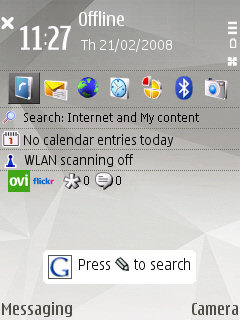
After pressing that key, you can type the terms of the search:
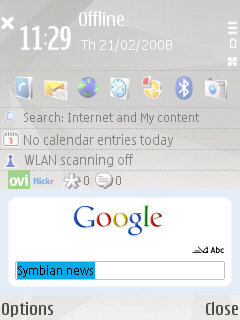
And then, an instance of the Webkit-based browser is launched offering the results:
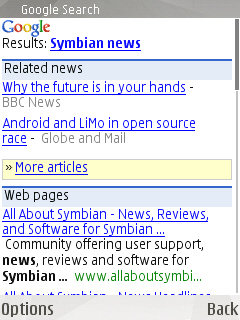
I was going to show my own screenshots but why repeat what others have already made in a great way. I took these ones from All About Symbian, after a quick Google search (how not!).
Saturday, December 29, 2007
Asus EEE
Asus EEE is a wonderful toy. But it lacks from some interesting features to win the choice of a Nokia N810 (touchscreen). Many people say that both of them should come with 3G connection, so you can really have an all-in-one portable device. Well, it is true that they both allow you to connect to a cellular network via Bluetooth or USB, but it is not the same.
So some people are trying to improve it by replacing its original screen with a touchscreen:
And, then, why not to add a 3G interface?
So some people are trying to improve it by replacing its original screen with a touchscreen:
And, then, why not to add a 3G interface?
Subscribe to:
Posts (Atom)