Showing posts with label s60 3rd edition. Show all posts
Showing posts with label s60 3rd edition. Show all posts
Thursday, September 18, 2008
Finding in Nokia Maps via Google Maps
If you are a user of Nokia Maps, you'll probably have realized that in no way it matches the searching capabilities of Google Maps. One thing that I did not know is that you can search in the s60 GMaps client and save the result as a favorite. now you'll find it in My Places inside the Nokia Maps app. More details and screenshots in The Nokia Blog.


Tuesday, March 04, 2008
Google Search on the idle screen
Over one year ago, many said that there would be a hard fight among mobile applications developers in order to win their place in the idle screen of mobile devices. Google has made its slight (and somehow invisible) move to make their move on the S60 3rd Edition platform.
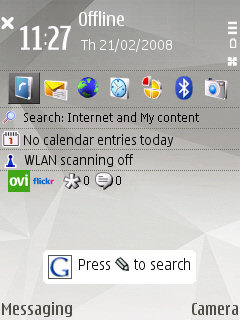
After installing their software (from your Webkit browser), everytime that the idle screen shows up (or the user unlocks the keyboard of your phone) a prompt is displayed with a remainder on the availability of the search interface by pressing the "Edit" key.

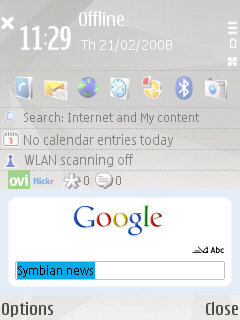
After pressing that key, you can type the terms of the search:

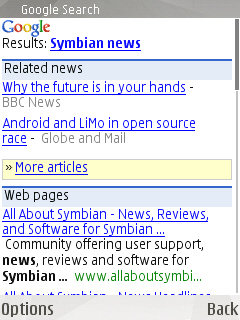
And then, an instance of the Webkit-based browser is launched offering the results:

I was going to show my own screenshots but why repeat what others have already made in a great way. I took these ones from All About Symbian, after a quick Google search (how not!).
After installing their software (from your Webkit browser), everytime that the idle screen shows up (or the user unlocks the keyboard of your phone) a prompt is displayed with a remainder on the availability of the search interface by pressing the "Edit" key.
After pressing that key, you can type the terms of the search:
And then, an instance of the Webkit-based browser is launched offering the results:
I was going to show my own screenshots but why repeat what others have already made in a great way. I took these ones from All About Symbian, after a quick Google search (how not!).
Sunday, October 14, 2007
Google Maps on S60 3rd Edition
Yes. S60 3rd Edition users will no longer have to use a Java client for Google Maps. A native Symbian client is available (go for it by pointing your Webkit or WAP mobile browser at http://www.google.com/gmm) and you'll be able to experience Google Maps thanks to a faster and less memory consuming software.
Friday, August 31, 2007
S60 3rd Edition and Bluetooth
Tuesday, August 07, 2007
Firmware updates and software versions hell
It looks like the (more powerful) second version of the Webkit browser will be only included in new products based on S60 3rd Edition FP1. It is incredible to me that devices like N80 won't be updated to FP1 and that we shall have to miss that version of such an innovative web browser.
You can see in s60.com/browser all the differences among both versions and you can see here how S60 developers refuse to include the new version in any S60 3rd Edition (non FP1) devices.
It is a pity how upgradable products are limited by the laziness of the companies. Nothing new under the sun, as we have been experiencing all this hell in DivX players and many other devices, with hardware powerful enough to carry on with new functionalities or improvements of existing ones, but with no new updates coming from the support team.
You can see in s60.com/browser all the differences among both versions and you can see here how S60 developers refuse to include the new version in any S60 3rd Edition (non FP1) devices.
It is a pity how upgradable products are limited by the laziness of the companies. Nothing new under the sun, as we have been experiencing all this hell in DivX players and many other devices, with hardware powerful enough to carry on with new functionalities or improvements of existing ones, but with no new updates coming from the support team.
Updating Nokia N80 firmware and S60 3rd edition memory handling
I have just updated the firmware version of my N80 from 4.0632.0.38 to 5.0719.0.2. It is the biggest version number change I have seen since I own this gadget, and it is the one in which less changes I have experienced (by now).

The only thing I have noticed is some more free megabytes of main memory (3 additional megabytes if I am not wrong), critical for applications like the Nokia S60 Webkit browser in order to avoid its often "Memory Full" error. It is great to have versions of desktop browsers in the mobile so we can try to experience the web as much desktop as possible, but it is true that many pages rich in multimedia (rich in images is enough) cannot be experienced in mobile phones because of their limited memory. This is why I bought Opera Mobile 8.60 and why I also install Opera Mini 3 and Opera Mini 4 beta. The WebKit browser developers should learn from Opera Mobile in what regards to image handling. I am not only talking about rescaling images so they take less memory, but about loading them in memory as I scroll through a web page. Even Opera Mobile might be improved: if there is a page filled with images and I scroll trying to see them all, a mobile phone can run out of memory... why not to keep loaded in memory only images being shown totally or partially in the display? Images previously displayed but not currently being shown might be available in a cache (if the device has additional flash memory available). Different memory handling strategies should be applied to different phone models, of course.
An additional problem comes when we want to have several applications running at the same time (music player , web browser and IM software, for example). If you launch an application starving for memory not available at that very moment, S60 3rd edition will close -with no warning at all- some older apps running (if not all). It is a matter of user experience to know when you can and when you cannot launch an applications, and which combination of apps can coexist without any of them dying.
I do not like this behaviour and would love to let users have more chances to choose what they want. Maybe a default behaviour of not letting a new app to be launched if there is not enough memory available and show a warning would be better. This way it would be me who might close some running applications and then relaunch the one I wanted.

The only thing I have noticed is some more free megabytes of main memory (3 additional megabytes if I am not wrong), critical for applications like the Nokia S60 Webkit browser in order to avoid its often "Memory Full" error. It is great to have versions of desktop browsers in the mobile so we can try to experience the web as much desktop as possible, but it is true that many pages rich in multimedia (rich in images is enough) cannot be experienced in mobile phones because of their limited memory. This is why I bought Opera Mobile 8.60 and why I also install Opera Mini 3 and Opera Mini 4 beta. The WebKit browser developers should learn from Opera Mobile in what regards to image handling. I am not only talking about rescaling images so they take less memory, but about loading them in memory as I scroll through a web page. Even Opera Mobile might be improved: if there is a page filled with images and I scroll trying to see them all, a mobile phone can run out of memory... why not to keep loaded in memory only images being shown totally or partially in the display? Images previously displayed but not currently being shown might be available in a cache (if the device has additional flash memory available). Different memory handling strategies should be applied to different phone models, of course.
An additional problem comes when we want to have several applications running at the same time (music player , web browser and IM software, for example). If you launch an application starving for memory not available at that very moment, S60 3rd edition will close -with no warning at all- some older apps running (if not all). It is a matter of user experience to know when you can and when you cannot launch an applications, and which combination of apps can coexist without any of them dying.
I do not like this behaviour and would love to let users have more chances to choose what they want. Maybe a default behaviour of not letting a new app to be launched if there is not enough memory available and show a warning would be better. This way it would be me who might close some running applications and then relaunch the one I wanted.
Tuesday, May 29, 2007
Still far from mobile web nirvana
I love Opera Mobile on my S60. Its content adaptation and page re-flowing at client side is very good where some other mobile browsers fail. It is even better than marvelous S60 Webkit browser, as it is a great memory consumer and crashes sometimes with certain pages containing lots of JavaScript.
About memory consume by Webkit browser, it is one of the main reasons for me to want Nokia N95 (160 MBs of internal memory vs N80's 40 MBs).
Well, the fact is that the trial period of Opera Mobile expired and I decided to buy it (I think it is worth 19 €). And I decided to do it from my N80. I went to http://www.opera.com/buy via S60 browser and problems started when I had to input data into a paginated form. No problem in 1st page, as I entered my personal details. But as I had to enter the EMEI of my phone (in the 2nd page of that form), I went into troubles. My phone tells me the EMEI, Opera Mobile tells me the EMEI but... no option to copy it. It is shown on the screen but I have to remember it or write it anywhere else.
Besides, S60 deletes partially filled inputs (at least in Opera Buy page) if I change the focus to another application (to see the damn number). And in one of my attempts, S60 Browser crashed. Luckily, Opera had already sent me an email confirming that they have all my personal info (as entered in the 1st page of the purchase form) and gave me an email and password.
Once again, email and password, when read through the mail client integrated in S60 3rd edition phones, cannot be copied and pasted (so we are again with the same problem).
At last, I will finish the purchase in a desktop browser. We are still far far away from mobile web nirvana.
About memory consume by Webkit browser, it is one of the main reasons for me to want Nokia N95 (160 MBs of internal memory vs N80's 40 MBs).
Well, the fact is that the trial period of Opera Mobile expired and I decided to buy it (I think it is worth 19 €). And I decided to do it from my N80. I went to http://www.opera.com/buy via S60 browser and problems started when I had to input data into a paginated form. No problem in 1st page, as I entered my personal details. But as I had to enter the EMEI of my phone (in the 2nd page of that form), I went into troubles. My phone tells me the EMEI, Opera Mobile tells me the EMEI but... no option to copy it. It is shown on the screen but I have to remember it or write it anywhere else.
Besides, S60 deletes partially filled inputs (at least in Opera Buy page) if I change the focus to another application (to see the damn number). And in one of my attempts, S60 Browser crashed. Luckily, Opera had already sent me an email confirming that they have all my personal info (as entered in the 1st page of the purchase form) and gave me an email and password.
Once again, email and password, when read through the mail client integrated in S60 3rd edition phones, cannot be copied and pasted (so we are again with the same problem).
At last, I will finish the purchase in a desktop browser. We are still far far away from mobile web nirvana.
Saturday, May 19, 2007
More on VoIP in Nokia N80
Some months ago I talked about VoIP in Nokia N80, the mobile pet with me for the last eight months.
Yesterday, I read in the RSS feed of Nokia Beta Labs the announcement of a new beta tool: Gizmo for S60.
I was a little bit surprised, because it seemed to be the release 1.21 of that tool, and I remember I had tried a version 3.xx. Some other stuff that confused me in Beta Labs announcement of this tool was the requirement to install Nokia Internet Services Support Package before Gizmo rel. 1.21 (it wasn't needed when using the .sis file downloadable in Gizmo Project official web page).
But they talked about IM messaging and online presence detection and it itched my curiosity. So I had to scratch it :-)
Besides, I had read somewhere that voipcheap.com (the SIP-based VoIP that won my personal contest) needs 80 Kbps while Gizmo (the other contestant) only needs 20 Kbps.
After installing both .sis files, Gizmo integrated itself with the Contacts tool of S60 3rd Edition. A new tab is displayed between Contacts and Groups called... Gizmo :-) There you can go online and all your Gizmo contacts will be displayed, showing their status. You can phone them to mobile phone, to landline phone or to SIP phone, and even chat with them. Great!
The decision I took in the past in favour of vopipcheap.com was based on two features: firstly, the chance to call for free to landlines of several countries worldwide, and transparent integration with S60 3rd Edition VoIP/SIP engine.
Being online in Gizmo and accessing the Internet Phone dialog in S60 3rd Edition OS kept on telling me that I was already connected to Gizmo and then the dialog closed. I do not know if I had tried this when I chose voipcheap (I could swear I did and it did not work but my lack of memory is legendary), but this time I tried to connect using Internet Phone dialog before using the Gizmo interface in contacts and it asked me to go online in voipcheap.com. Nice, this time Gizmo did not overwrite my preference of having the other VoIP service as default.
But the big surprise, after a successful connection to voipcheap.com was Internet Phone asking me to connect to Gizmo too. This is the best configuration, so you can be connected to as many SIP-based VoIP services as you want at the same time using the same OS-integrated interface.
Then I went to Gizmo tab in Contacts and I was online and seing my Gizmo contacts' state.
It was all OK except for:
- I tried to call my wife from my N80 via WiFi to our PC and sound quality was poor. She said she could hear me perfectly but I heard a lot of noise (and we repeted the experience three times). So I still have to check that great performance of Gizmo with such a few bandwidth.
- I tried to call my landline phone and a nice voice told me that I had no call-out credits. Gizmo web site says that you can call other contacts' phones for free (see instructions in their web page). My wife is a contact and our phone is shown in her profile so... I do not understand what happens. voipcheap.com is greater about this. You have a list of countries with free calls (and some of them include mobile phones, not only landlines). I guess it has to see somehow with the fact that I am not an "active user". I will have to check what that is (I thought it was achieved by following the 3 steps in Gizmo web page, but it seems to be bot enough). I will take a deep look on this.
Yesterday, I read in the RSS feed of Nokia Beta Labs the announcement of a new beta tool: Gizmo for S60.
I was a little bit surprised, because it seemed to be the release 1.21 of that tool, and I remember I had tried a version 3.xx. Some other stuff that confused me in Beta Labs announcement of this tool was the requirement to install Nokia Internet Services Support Package before Gizmo rel. 1.21 (it wasn't needed when using the .sis file downloadable in Gizmo Project official web page).
But they talked about IM messaging and online presence detection and it itched my curiosity. So I had to scratch it :-)
Besides, I had read somewhere that voipcheap.com (the SIP-based VoIP that won my personal contest) needs 80 Kbps while Gizmo (the other contestant) only needs 20 Kbps.
After installing both .sis files, Gizmo integrated itself with the Contacts tool of S60 3rd Edition. A new tab is displayed between Contacts and Groups called... Gizmo :-) There you can go online and all your Gizmo contacts will be displayed, showing their status. You can phone them to mobile phone, to landline phone or to SIP phone, and even chat with them. Great!
The decision I took in the past in favour of vopipcheap.com was based on two features: firstly, the chance to call for free to landlines of several countries worldwide, and transparent integration with S60 3rd Edition VoIP/SIP engine.
Being online in Gizmo and accessing the Internet Phone dialog in S60 3rd Edition OS kept on telling me that I was already connected to Gizmo and then the dialog closed. I do not know if I had tried this when I chose voipcheap (I could swear I did and it did not work but my lack of memory is legendary), but this time I tried to connect using Internet Phone dialog before using the Gizmo interface in contacts and it asked me to go online in voipcheap.com. Nice, this time Gizmo did not overwrite my preference of having the other VoIP service as default.
But the big surprise, after a successful connection to voipcheap.com was Internet Phone asking me to connect to Gizmo too. This is the best configuration, so you can be connected to as many SIP-based VoIP services as you want at the same time using the same OS-integrated interface.
Then I went to Gizmo tab in Contacts and I was online and seing my Gizmo contacts' state.
It was all OK except for:
- I tried to call my wife from my N80 via WiFi to our PC and sound quality was poor. She said she could hear me perfectly but I heard a lot of noise (and we repeted the experience three times). So I still have to check that great performance of Gizmo with such a few bandwidth.
- I tried to call my landline phone and a nice voice told me that I had no call-out credits. Gizmo web site says that you can call other contacts' phones for free (see instructions in their web page). My wife is a contact and our phone is shown in her profile so... I do not understand what happens. voipcheap.com is greater about this. You have a list of countries with free calls (and some of them include mobile phones, not only landlines). I guess it has to see somehow with the fact that I am not an "active user". I will have to check what that is (I thought it was achieved by following the 3 steps in Gizmo web page, but it seems to be bot enough). I will take a deep look on this.
Saturday, December 09, 2006
Unforgivable bug
Some days ago, I closed and opened again S60 3rd edition web browser and it stopped working. I get nothing but a message saying "Web: Already in use" since then. It seems to be a problem quite often found in this browser. The only fix found seems to be a "hard reset" of the phone or a firmware upgrade. I hope Nokia works on it in future versions of the browser.
As I won't update firmware until I manage to force a version including support for Spanish language (see this post to know why), I cannot fix it with the latter option. And, dear friends at Nokia, I cannot hard reset everytime that an application gets corrupted.
I will try to seek for any file playing the role of a lock by using Y-Browser or SExplorer. Anyway, I do not feel confident to succeed, taking into account that no one else seems to get it working again but by using any of both previously commented methods.
As I won't update firmware until I manage to force a version including support for Spanish language (see this post to know why), I cannot fix it with the latter option. And, dear friends at Nokia, I cannot hard reset everytime that an application gets corrupted.
I will try to seek for any file playing the role of a lock by using Y-Browser or SExplorer. Anyway, I do not feel confident to succeed, taking into account that no one else seems to get it working again but by using any of both previously commented methods.
Saturday, October 14, 2006
Nokia N95
I had seen these videos about the new Nokia N95 some days ago. I was talking to my sister-of-soul, Hilweh, about how cool this phone is and I said to her that I would send her some YouTube references. I think I'll better share them with the audience (if this blog has any :-) ). So I want to change my N80 for this:
Anybody up for the deal? :-)
Another video here showing a Nokia 95 working:
Anybody up for the deal? :-)
Another video here showing a Nokia 95 working:
Friday, October 13, 2006
Tuning your phone memory
As I said in the previous post, reinstalling software to fix some secondary effects in my N80 has led me to write about configuration of memory in mobile phones.
The N80 with its firmware v4 had a cool application called Mobile Search from Nokia. The problem is that it is installed in the memory on-board the phone. This is normal as it is a pre-installed application, although I do not like all the local plug-ins (english, french, norwegian and almost all of the languages supported by the phone - excluding spanish, as mentioned in my previous post).
Mobile search takes 1 MB of memory, plus 228 KB of global plugin and about 40 KB per local plug-in. Local plug-ins are in charge of the burden of searching in local context (looking for spanish companies, for instance).
Taking into account that the phone has 40 MBs on-board and comes with a 128 MBs miniSD card, we should have the option to move applications to our memory card. What I did is uninstall all the plug-ins and then the app itself. I installed it from the web page (directly via WiFi, thanks to the Safari-based browser) right to my memory card, including the spanish local plug-in. The 1 MB that phone memory gained lets me now open some complex web pages that made the phone display an Out-Of-Memory message.
Unluckily, this can be done with Mobile Search as it is downloadable free software. I wish I could move to my 1 GB miniSD stuff like QuickOffice (2 MBs) and Adobe Reader LE (2 more MBs). Can't uninstall and reinstall as they are not freely downloadable, AFAIK.
This should be a must for next S60 (3rd ed FP2?) or Symbian (9.4?) version.
The N80 with its firmware v4 had a cool application called Mobile Search from Nokia. The problem is that it is installed in the memory on-board the phone. This is normal as it is a pre-installed application, although I do not like all the local plug-ins (english, french, norwegian and almost all of the languages supported by the phone - excluding spanish, as mentioned in my previous post).
Mobile search takes 1 MB of memory, plus 228 KB of global plugin and about 40 KB per local plug-in. Local plug-ins are in charge of the burden of searching in local context (looking for spanish companies, for instance).
Taking into account that the phone has 40 MBs on-board and comes with a 128 MBs miniSD card, we should have the option to move applications to our memory card. What I did is uninstall all the plug-ins and then the app itself. I installed it from the web page (directly via WiFi, thanks to the Safari-based browser) right to my memory card, including the spanish local plug-in. The 1 MB that phone memory gained lets me now open some complex web pages that made the phone display an Out-Of-Memory message.
Unluckily, this can be done with Mobile Search as it is downloadable free software. I wish I could move to my 1 GB miniSD stuff like QuickOffice (2 MBs) and Adobe Reader LE (2 more MBs). Can't uninstall and reinstall as they are not freely downloadable, AFAIK.
This should be a must for next S60 (3rd ed FP2?) or Symbian (9.4?) version.
Subscribe to:
Posts (Atom)