In the last two weeks, a new maemo friend is in town. He is an old colleague and workmate who has just bought an N810 and developed this in such a few time. Don't you think he will be a valuable contributor to the maemo scene? :-)
Watch the video:
Friday, April 11, 2008


Sunday, April 06, 2008
Maemo is getting better and better
A lot of good news on Maemo.
Canola 2 jumps to beta 8 with lots of bugs fixed:
I copied this from the news page of the Canola 2 project at INdT, as there seems to be no permalinks for their news.
All existing add-ons (YouTube, so far) and themes have been updated and you should go for the last version if you change to Canola 2 beta 8.
But the best is yet to be told: there is a LastFM plugin! I love it, although its functionality does not match (yet) Vagalume's. But, to be fair, Vagalume does not have so great interface as Canola.
Ah, and more things not yet supported but in sight:
The YouTube results paging is a must as now the interface does limit the number of results you can enjoy. And what to say about the chance to access remote contents via UPnP. Media in your S60 3rd Edition phone or your PS3.
More on Maemo: as announced in the CTIA'09, the WiMax version is coming. Errrr... well, congratulations to the ones who will buy it and use WiMax, but I do not think this will happen in Spain. The best news from the last edition of CTIA was said in the same announcement from Nokia as some sort of additional-and-less-important information (source: Internet Tablet Talk):
So N800 and N810 owners should be looking forward to a new system update for these gadgets.
And last but not least, some more disruptive applications for the N800/N810. I am still checking out Numpty Physics and trying to advance to the 4th stage :-) MyPaint screenshots look amazing although I guess that drawing is not one of the things that I best do. Anyway, I will try to get better at it and try to develop cool stuff like these:


Canola 2 jumps to beta 8 with lots of bugs fixed:
Better third-party plugin support: More API available for third-party plugin development.
Better handling of large titles in titlebar.
Fix during cover change.
Sort files inside "Browse by Folder".
Show current time during seek.
Fixed bugs in video player.
Ability to refresh podcast feeds manually.
Ability to select where downloaded contents go.
Smooter animation in the lists and sub menus.
General theme improvements.
Allow more podcast feeds.
Support compressed feeds and request them by default.
Better handle out of space.
Show more normalized download velocity and time remaining.
Various fixes in network handling in Podcast.
Restart downloads when podcast plugin is loaded.
Make it possible to preview the podcast description in the list.
Make it possible to read the feed description while listening to the podcast episode.
Remove episodes from "Podcast: New Episodes" when listened to or deleted.
Show the podcast feed title in the player as album and not the parent title.
Ogg support for the Scanner is back.
I copied this from the news page of the Canola 2 project at INdT, as there seems to be no permalinks for their news.
All existing add-ons (YouTube, so far) and themes have been updated and you should go for the last version if you change to Canola 2 beta 8.
But the best is yet to be told: there is a LastFM plugin! I love it, although its functionality does not match (yet) Vagalume's. But, to be fair, Vagalume does not have so great interface as Canola.
Ah, and more things not yet supported but in sight:
Playlist creation (on-the-move) + Playlist saving and other related features
Youtube paging capabilities for the search results (to allow more results to be browsed)
UPNP support
PNG thumbnail support still missing
Full hardware key mapping support
The YouTube results paging is a must as now the interface does limit the number of results you can enjoy. And what to say about the chance to access remote contents via UPnP. Media in your S60 3rd Edition phone or your PS3.
More on Maemo: as announced in the CTIA'09, the WiMax version is coming. Errrr... well, congratulations to the ones who will buy it and use WiMax, but I do not think this will happen in Spain. The best news from the last edition of CTIA was said in the same announcement from Nokia as some sort of additional-and-less-important information (source: Internet Tablet Talk):
upgraded OS2008 [that] introduces useful new features to the platform, including an enhanced e-mail client, support for Chinese character rendering in the browser and RSS feeds and Seamless Software Update functionality to eliminate manual software updates, making periodic updates of the operating system quick and easy. While standard on the Nokia N810 WiMAX Edition, current owners of Nokia N810 and N800 Internet Tablets with earlier operating systems will be able to upgrade their device to the revised operating system for free during the second quarter of 2008.
So N800 and N810 owners should be looking forward to a new system update for these gadgets.
And last but not least, some more disruptive applications for the N800/N810. I am still checking out Numpty Physics and trying to advance to the 4th stage :-) MyPaint screenshots look amazing although I guess that drawing is not one of the things that I best do. Anyway, I will try to get better at it and try to develop cool stuff like these:


Saturday, March 22, 2008
Canola strikes again
The guys from INdT strike again with the Beta 7 version of Canola2. Besides all the changes (basically, support for third-party plugins), they offer a new add-on to access the contents of YouTube. I think that I shall seldom visit YouTube with MicroB.
This add-on is amazing. If you have an N800 or an N810, I do not know what you are doing here. Go get it!
This add-on is amazing. If you have an N800 or an N810, I do not know what you are doing here. Go get it!
Friday, March 21, 2008
Rise of the mobile
Do you want to see how fast mobile phones are spreading?
Click here :-)
Note that you can move the pointer over different regions of the world to see their specific increasement of mobile subscriptions.
Click here :-)
Note that you can move the pointer over different regions of the world to see their specific increasement of mobile subscriptions.
Mobile vs Desktop
I like saying that mobile is just different to desktop, while there is a general thought about mobile being less than desktop.
jonarne's blog gives his opinion (which I share) in a funny way.
jonarne's blog gives his opinion (which I share) in a funny way.
Sunday, March 09, 2008
Testing maemo wordpy
I had a task pending on the N810. Try posting here on maemo wordpy, a tool that initially allowed blogging on wordpress weblogs but that supports blogger since 2 or 3 releases ago.
Job done, and I hope that this tool will increase my posting rate, as I tend to use the laptop less and less often in my leisure time.
Job done, and I hope that this tool will increase my posting rate, as I tend to use the laptop less and less often in my leisure time.
Friday, March 07, 2008
Tuesday, March 04, 2008
Google Search on the idle screen
Over one year ago, many said that there would be a hard fight among mobile applications developers in order to win their place in the idle screen of mobile devices. Google has made its slight (and somehow invisible) move to make their move on the S60 3rd Edition platform.
After installing their software (from your Webkit browser), everytime that the idle screen shows up (or the user unlocks the keyboard of your phone) a prompt is displayed with a remainder on the availability of the search interface by pressing the "Edit" key.

After pressing that key, you can type the terms of the search:

And then, an instance of the Webkit-based browser is launched offering the results:

I was going to show my own screenshots but why repeat what others have already made in a great way. I took these ones from All About Symbian, after a quick Google search (how not!).
After installing their software (from your Webkit browser), everytime that the idle screen shows up (or the user unlocks the keyboard of your phone) a prompt is displayed with a remainder on the availability of the search interface by pressing the "Edit" key.
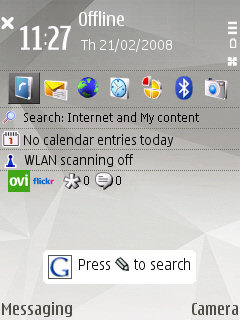
After pressing that key, you can type the terms of the search:
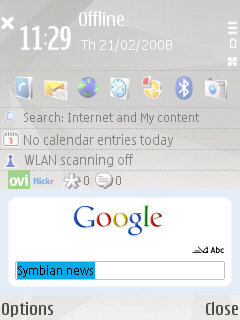
And then, an instance of the Webkit-based browser is launched offering the results:
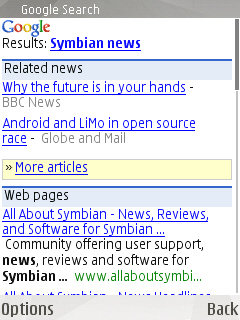
I was going to show my own screenshots but why repeat what others have already made in a great way. I took these ones from All About Symbian, after a quick Google search (how not!).
Subscribe to:
Posts (Atom)